
Compare our inspection reports
We find defects.
We don’t write novels.
Clear photographs. Short descriptions. Practical next steps. See how GoInspect makes handover inspection reports easier to understand and multi-residential defect reporting easier to use.
Our focus is the work that needs attention: where it is, what it looks like and which trade needs to act.
New home handover & practical completion inspections
Clear reports help get defects fixed. When builders and trades can see the issue and understand what needs doing, they can get on with rectification. Compare the layouts below, then open a real GoInspect sample.
Three report styles. A clear difference.
The Novel
Other inspectors — illustrated report style
Long-form technical report
- Lengthy technical explanations
- Repair actions within paragraphs
- More text to work through
The Photo Hunt
Other inspectors — illustrated report style
Separate defect list and photos
- Photos on separate pages
- Match numbers to descriptions
- Flip back for locations and trades
GoInspect
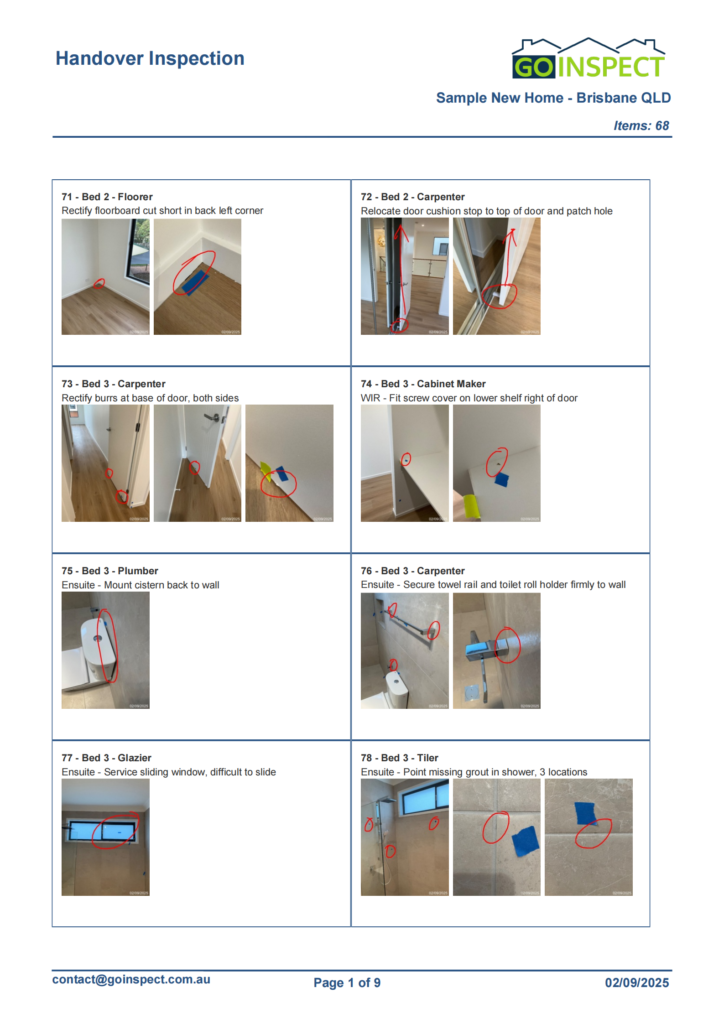
GoInspect — actual sample report
Straight to the point
- Photos and instructions together
- Location and trade with each item
- Short, direct repair descriptions
- PDFs you can save, print and share
- Same-day photo reports
- A clear list of defects to rectify.
- Clear instructions that help builders and trades get defects fixed
The first two columns illustrate report formats, not individual providers. GoInspect preview: actual public sample report.
The details together
See the issue.
Know the next step.
No jumping between a defect list and a separate photo index. Each GoInspect report item keeps the useful information together.
- A clear locationThe dwelling, room or area helps everyone find the same issue.
- Photographs beside the findingSee the condition we recorded, alongside the description.
- Short, direct descriptionsUnderstand what needs attention without searching through paragraphs.
- The relevant tradeHelp the builder direct the work to the right person.
Builders & developers
Fast to record.
Clear to rectify.
The Complicated Way
Other systems — illustrated workflow
A generic example of a complicated process.
- Repetitive entry and extra administration
- Plan-heavy setup and awkward room changes
- Photos and instructions scattered apart
- Depending on portal access to view findings
- Unrelated items for trades to sift through
- Hard-to-follow rectification records
The GoInspect Way
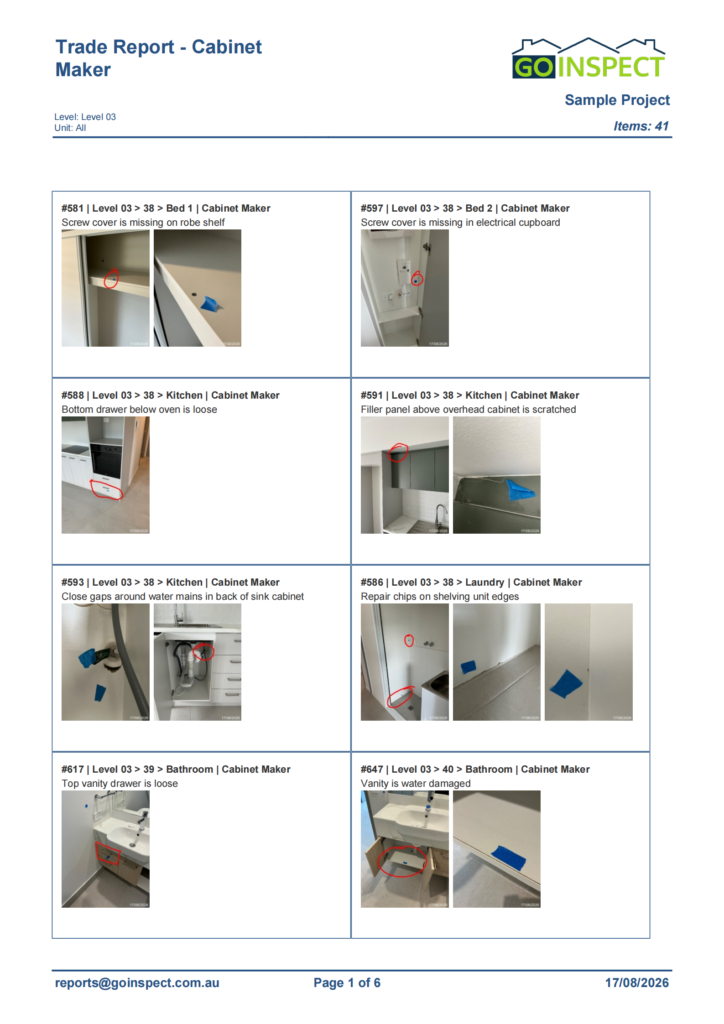
GoInspect — actual sample trade report
Modern. Fast. Straightforward. Powered by InspectaMate.
- Quick on-site defect capture
- Flexible room and location management
- Clear photo instructions that help trades get defects fixed
- PDF reports trades can save, print and share
- Relevant trade worklists across dwellings
- Clear records for checking rectification
Clear reports help supervisors and trades understand what needs fixing and get on with rectification.
Illustrative workflow comparison. GoInspect preview: actual sample trade report.
One trade. Multiple dwellings. A focused worklist.
A cabinetmaker doesn’t need to sift through the painter’s work. We can group the relevant items across multiple apartments or townhouses into a trade-specific report, with the dwelling, room, item ID, photograph and repair description together.
Open our actual cabinetmaker sample to see how the work is organised across dwellings.
Our reporting workflow
Less administration.
More attention on the work.
GoInspect uses InspectaMate to capture findings on site and turn them into practical reports for owners, supervisors and trades.
Record on site
Log the finding, add photographs and select the location and trade. Add or change rooms as the inspection requires.
Share relevant work
Issue an individual dwelling report or a focused trade worklist across dwellings. PDFs can be saved, printed and shared.
Check rectification
Use the original item IDs, locations and photographs to compare repairs with the findings at an agreed re-inspection.
Do I need an app or account to read the reports?
No. Our sample reports are PDFs you can open in a standard PDF viewer. You can save, print or forward the file without a separate reporting-system account.
Does a longer report mean a better inspection?
Page count alone does not tell you how thorough an inspection was. Look at the recorded findings, photographs, locations and how clearly the report explains the work requiring attention.
Can reports guarantee that every defect will be fixed?
Reports provide a clear record to support rectification. The builder and trades carry out the repairs; the inspection scope and any re-inspection arrangements are agreed separately.
GoInspect · Working for you.
Clear findings.
A more straightforward handover.
Book an independent handover inspection for your new home, or talk to us about quality control and defect reporting across your development.
Questions about your inspection? Contact GoInspect →