
A building inspection produces more than a list of things to fix. It creates a record that the owner, builder and relevant trades need to understand and use.
At GoInspect, we use InspectaMate building inspection software to organise that information. The aim is straightforward: keep the observed concern, location, photographs and trade allocation together, so the next conversation can focus on the actual item.
This article explains the software we use in our inspection work, what it contributes to the report and why that matters to the people receiving it.
What is InspectaMate?
InspectaMate is browser-based building inspection and defect management software. It brings defect entries, annotated photographs, PDF reporting and follow-up records into one workspace.
It can be used for a single home or a larger project with buildings, levels and individual units. Inspectors can record the location and description of a finding, attach photographs and allocate a relevant trade.
The software organises the inspection information. The inspector still needs to examine the work, describe the observation accurately and decide what needs further attention.
From a finding on site to an item in your report
A useful entry should help someone find the concern again. A photograph alone may leave the reader asking which room it shows or what the inspector wants them to look at.
Our reporting approach brings together four details:
- Location: the room, area or relevant part of the property.
- Description: what was observed and what needs attention or clarification.
- Photographs: images that show the reported condition.
- Trade allocation: the relevant trade where an allocation can reasonably be made.
InspectaMate supports that structure with searchable locations and trades, saved descriptions and photo markup. An annotation can draw attention to the particular gap, connection or surface being discussed.
Saved wording is a starting point. The description needs to match the actual condition and location rather than simply repeat a generic entry.
A real example: a frame-stage inspection
Our frame-inspection checklist includes examples from an anonymised GoInspect report.
One finding records bottom plates and studs lacking adequate bearing at a shower set-down. Another records a waste pipe conflicting with the wall-frame position.
Those are different concerns. The location, description and photographs help the supervisor identify which detail is being discussed and coordinate the appropriate response. The report asks for the framing concern to be addressed against the relevant framing and engineering requirements; it does not invent a repair from a photograph.
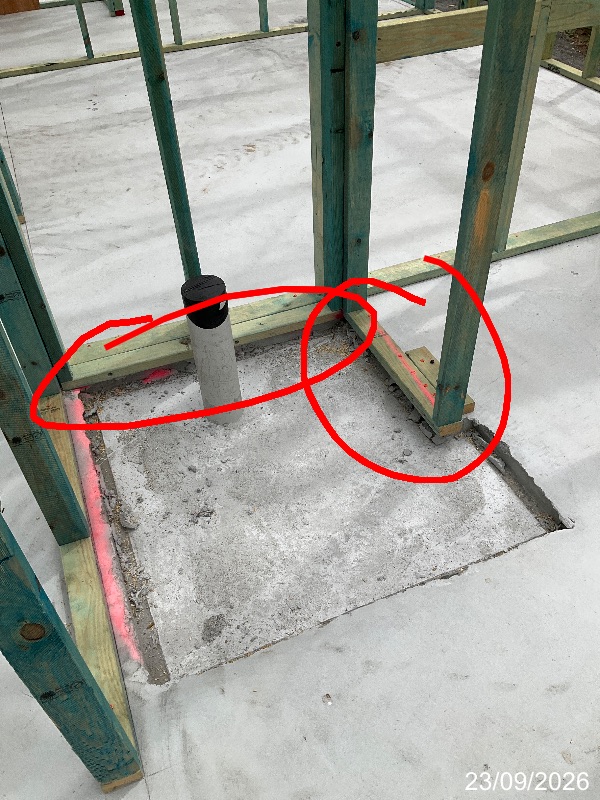
You can view the anonymised sample frame-stage report to see how the information is presented.
Why trade allocation is useful
A new home involves several trades, and some findings involve more than one.
Allocating a trade helps the builder organise the reported items. It can distinguish an item needing a carpenter’s attention from one requiring a plumber or another contractor.
InspectaMate can produce reports organised by trade, as well as by building or unit. That is useful when a project team needs to share the relevant items with the people reviewing or rectifying them.
The allocation helps coordination. Where the cause or responsibility is unclear, the description should say what needs investigation. The builder may need to review the drawings, consult another trade or obtain specialist advice before deciding on the response.
Clear reports for homes and apartment projects
On a house inspection, a report needs to be manageable for the owner and site supervisor. On an apartment development, the same concern might need to be located by building, level and unit.
InspectaMate offers PDF layouts with one, four or eight items per page, alongside a list layout. It also provides project and trade reporting.
The layout should suit the information being communicated. Readers need enough detail to understand each finding and a clear way to refer back to it.
Our Brookland Robertson Stage 2 project page describes one inspection program where GoInspect used InspectaMate to organise findings and support reporting.
Keeping a useful record during follow-up
After receiving the report, the owner or project team can discuss the findings with the builder and record the response against the relevant item.
If a re-inspection is arranged, the original item provides a reference for checking the reported concern. InspectaMate supports updating entries, adding supporting photographs and managing open and closed items.
Changing a status in software is an administrative action. The information behind that change still matters: what was checked, what was observed and whether anything remains outstanding.
For homeowners, keeping the original report and relevant correspondence together also makes later discussions easier to follow.
What should you look for in an inspection report?
When comparing inspection services, ask to see an actual sample and consider whether you can:
- Find the room or area being discussed.
- Understand the observation without guessing what the photograph means.
- Match each description to its photographs.
- Identify the relevant trade where one has been allocated.
- Refer to an item clearly when discussing the next step.
Software supports consistent reporting, but the value starts with the inspection and the accuracy of the information recorded.
See the reporting process for yourself
If you are arranging an inspection, explore our handover inspections or construction-stage inspections. You can also get an inspection quote online.
For inspectors and project teams interested in the software, visit InspectaMate’s features and sample reporting options.